
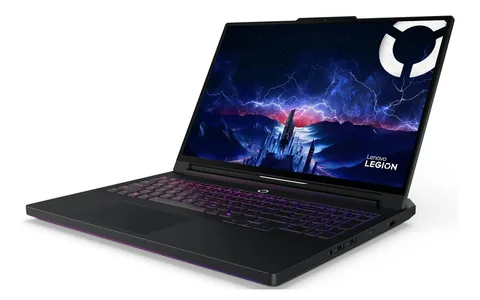
 Lenovo Legion Pro 7i Gen 10 (RTX 5080 configuration)
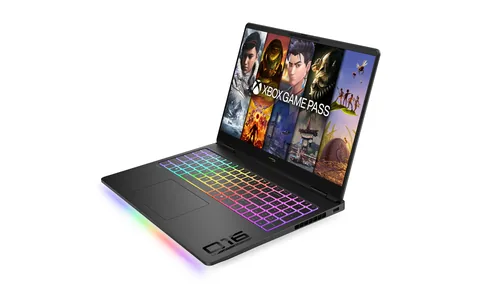 HP / HyperX OMEN MAX 16 (RTX 5090 configuration, 16-ah1932nr)
Both are 16-inch 2560 × 1600 OLED gaming laptops with 175W-class GPUs. The Legion Pro 7i configuration pairs a Core Ultra 9 275HX with an RTX 5080, and the OMEN MAX 16 configuration a Core Ultra 9 290HX Plus with an RTX 5090. Notebookcheck praised the Legion’s performance and OLED, while Tom’s Hardware criticised the OMEN’s price-to-performance.
| Specification | Lenovo Legion Pro 7i Gen 10 (RTX 5080 configuration) | HP / HyperX OMEN MAX 16 (RTX 5090 configuration, 16-ah1932nr) |
|---|---|---|
| CPU | Intel Core Ultra 9 275HX, 24 cores / 24 threads | Intel Core Ultra 9 290HX Plus, 24 cores / 24 threads |
| GPU | NVIDIA GeForce RTX 5080 Laptop GPU, 16GB GDDR7, up to 175W TGP in this configuration | NVIDIA GeForce RTX 5090 Laptop GPU, 24GB GDDR7, up to 175W TGP |
| Memory / storage | Notebookcheck test unit: 32GB DDR5-6400 and 1TB NVMe SSD; retail SKUs vary | 32GB DDR5-6400; 2TB PCIe Gen 5 NVMe SSD |
| Display | 16-inch 2560 × 1600 OLED, 240Hz | 16-inch 2560 × 1600 OLED, up to 240Hz |
| Battery / adapter | 99.9Wh battery; 400W AC adapter in the reviewed configuration | 83Wh battery; 460W AC adapter |
What the specifications show
The reviewed Legion Pro 7i Gen 10 configuration uses a Core Ultra 9 275HX and an RTX 5080 Laptop GPU with 16GB of GDDR7 at up to 175W, with a 99.9Wh battery and a 400W adapter. The OMEN MAX 16 configuration uses a Core Ultra 9 290HX Plus and an RTX 5090 Laptop GPU with 24GB of GDDR7 at up to 175W, with an 83Wh battery and a 460W adapter.
Both pair a 16-inch 2560 × 1600 OLED panel with up to 240Hz refresh. The memory and storage rows are not directly comparable: the Legion row describes the Notebookcheck test unit and notes that retail SKUs vary, while the OMEN row lists the HP configuration.
What independent reviews add
Notebookcheck found strong performance from the Legion’s Core Ultra 9 and 175W RTX 5080 combination and a standout 240Hz OLED, balanced against high power draw, very high CPU temperatures under gaming load, fan noise in Performance mode and a heavy adapter. Tom’s Hardware’s August 2026 review of the OMEN MAX 16 noted a solid chassis, user-upgradeable memory and a PCIe Gen 5 SSD, but judged the price-to-performance poor against similarly priced gaming laptops.
These are separate reviews of specific configurations. Do not transfer either verdict to other variants of the same product family.
How to decide
Confirm the exact machine configuration before comparing prices or reviews, since CPU, GPU power limits, memory, storage and region can all differ. Weigh the premium for the RTX 5090 configuration against the value criticism, and check weight, adapter size and noise against how and where you will use the laptop.
Frequently asked questions
Which laptop has the faster GPU?
The reviewed OMEN MAX 16 configuration has an RTX 5090 Laptop GPU with 24GB of GDDR7, and the Legion Pro 7i configuration has an RTX 5080 Laptop GPU with 16GB. Both list up to 175W, and TWW has not measured either.
Do both laptops have OLED screens?
Yes. Both configurations list a 16-inch 2560 × 1600 OLED display with up to 240Hz refresh.
Can I upgrade the memory and storage?
The Legion Pro 7i profile lists two memory slots and two M.2 storage positions, and Tom’s Hardware noted user-upgradeable memory and a PCIe Gen 5 SSD on the OMEN MAX 16. Supported sizes vary, so check the exact model before buying parts.
Can I rely on these reviews for any Legion Pro 7i or OMEN MAX 16?
No. Each review is specific to the configuration it tested. Verify the exact model, GPU power limit, memory and storage before applying the findings.
This comparison uses manufacturer specifications and attributed outside review findings of specific configurations. TWW has not tested either laptop.
Lenovo Legion Pro 7i Gen 10 (RTX 5080 configuration) specifications and sources →
HP / HyperX OMEN MAX 16 (RTX 5090 configuration, 16-ah1932nr) specifications and sources →